How Do I Stop Bots From Spamming My Contact and Signup Forms?
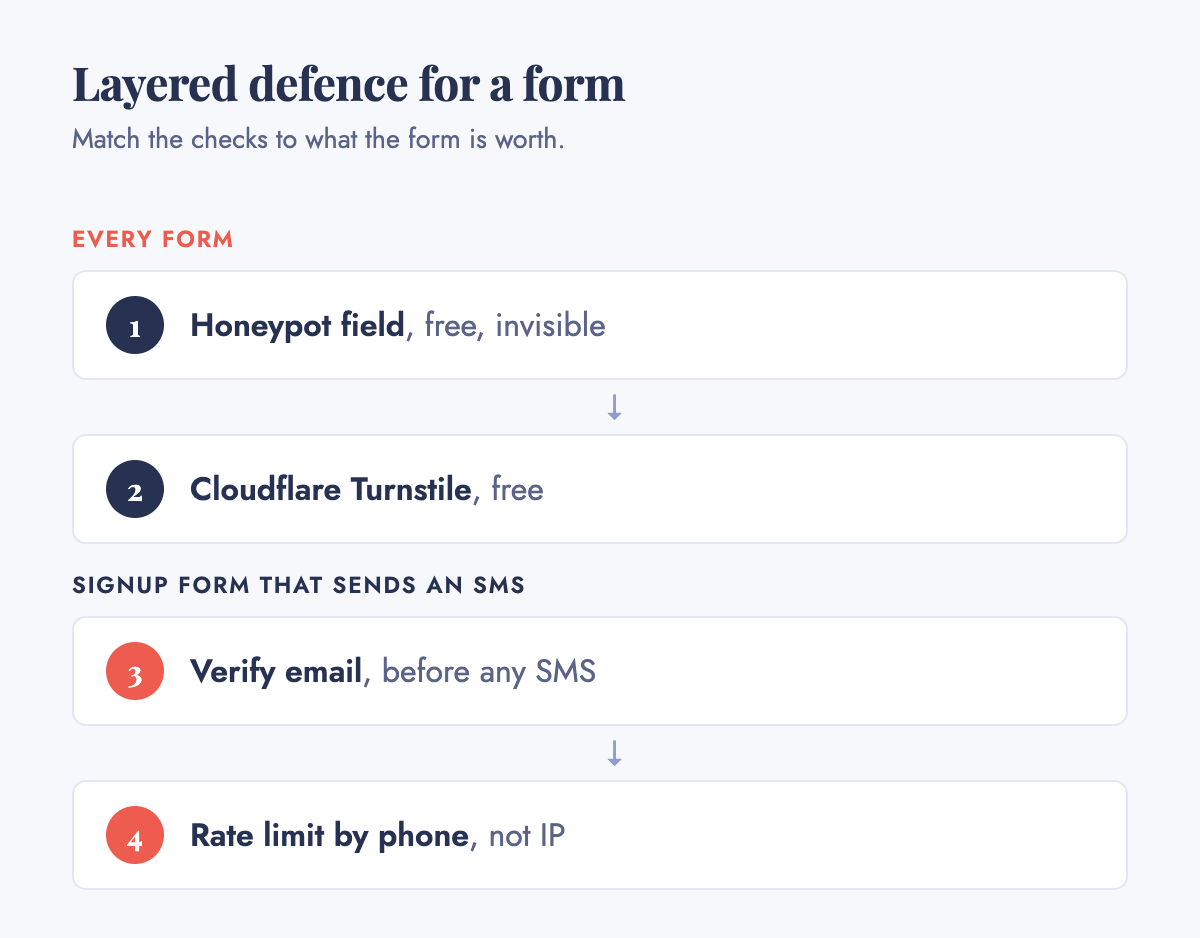
Short answer: For a contact form, start with a hidden honeypot field plus Cloudflare Turnstile, whose Managed mode is free with no usage cap. Each takes a few lines of code. For a signup form, the honeypot and Turnstile help, but the bigger risk is different: a phone number field that lets someone route thousands of SMS messages through your Twilio or Firebase bill, known as SMS pumping or toll fraud. Twilio said in 2023 that its filter for this one fraud had saved its customers $62.7 million. Fix it by verifying email before you ever touch SMS, limiting which countries you send codes to, and rate-limiting by phone number and account, because IP address is the easiest signal for a bot to change. Put these checks at the steps that cost you something, the submit button and the OTP send, not the page load.
My contact form gets spam before lunch. What actually stops that?
Start with the honeypot, because it is free and invisible to real visitors. The OWASP Foundation's Bot Management and Anti-Automation Cheat Sheet gives a working example: an <input type="text" name="company_url"> field inside a block moved off-screen, labelled "Leave this field empty", with tabindex="-1" so keyboard users skip it and aria-hidden="true" so screen readers ignore it. A script that fills in every field puts something in it. A person never sees it, so it stays empty. Reject anything that arrives with a value in it.
Small-site owners reach for the same trick. On Hacker News, Ask HN: My signup form is being bombarded by bots. What do I do? (4 points, posted 2023-11-01 by u/anon8588, who had already tried Google reCAPTCHA and found it cut the rate but did not stop it) got a short, concrete list from u/emedchill: use CSRF tokens, throttle the route since a new user should not need to hit it more than once, don't tell the visitor whether an address exists ("if your email exists, you should receive an email soon" rather than a yes or no), and "honeypots can be useful if the spammer(s) isn't keeping a close eye on their scripts." u/undyingtrillion suggested the same trick in the same thread: "fake fields that are not visible to the user. If they have any value in the form submission they are scripts and can be rejected."
A honeypot alone will not hold against a script built to defeat it. That is where Turnstile comes in. Troy Hunt, who runs Have I Been Pwned, wrote up what happened when he put Cloudflare's invisible Turnstile in front of a search API that only the site's own home page was meant to call, after requests had peaked at 121,300 in five minutes. Five months and more than 100 million challenges after switching it on, he reported no abnormal traffic spikes to that endpoint. In the week before he published, 91% of issued challenges were solved without the visitor doing anything, and of the 990,000 requests Turnstile rejected, almost 40% came from the same five clients. That is far more traffic than a small business sees, but the mechanism suits a contact form: a person never sees a puzzle, and a script without a valid token gets turned away. Cloudflare's general availability announcement says Turnstile's "Managed" mode is "completely free to everyone for unlimited use."
A second thread shows the limits of this stack. Ask HN: Contact form spam despite trying everything (2 points, 2025-06-02, u/pettycashstash2) came from someone who had already tried CleanTalk, two versions of reCAPTCHA, Turnstile ("bots seem to be solving it"), honeypots, rate limiting and keyword filtering, and still had spam getting through. u/sds357's reply is the one worth keeping: "I eliminated virtually all spam submissions on my site by using hidden fields and checking for common browser automation flags." Asked which flags, he linked MDN's page on the browser's navigator.webdriver property and wrote "If true, block." No single layer stops everything. Each cheap check removes another slice of the scripts, until what's left is small enough to delete by hand.
Do I still need a CAPTCHA on top of this?
Usually not for a contact form. Turnstile is a CAPTCHA replacement; it just doesn't show your visitor a puzzle to solve. Whether an old-style image CAPTCHA still buys you anything, and what the solve-rate research says about it, is the subject of the second post in this series. For a contact form, my advice is not to add one on top of Turnstile. It adds friction for real visitors, and the second thread above shows determined scripts getting past both kinds.
My signup form is running up an SMS bill for numbers that never convert
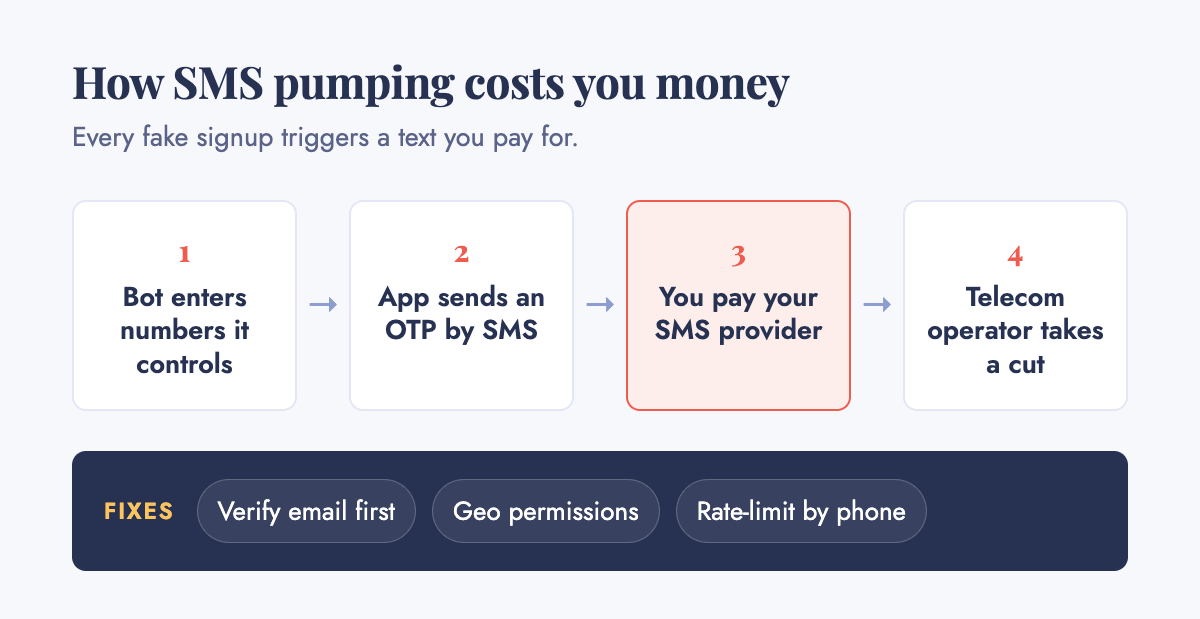
This is the one that costs real money, and it is a different problem from form junk. If your signup flow sends a one-time password by SMS, every phone number typed into that field can trigger a charge from your SMS provider. Someone can enter a list of numbers they control, often with a telecom operator taking a cut, purely to trigger message sends and pocket a share of the fees. Nobody ever completes signup. You get billed anyway.
The best-known example is Twitter's. In a Twitter Spaces discussion on December 20, 2022, reported by the telecoms trade publication Commsrisk, Elon Musk said: "I discovered this, basically, about 10 days ago, that Twitter was being scammed to the tune of 60 million dollars a year for SMS texts, not counting North America… there are telcos who are not being super honest out there… running, like, two-factor authentication SMS texts over and over again, and just creating a zillion bot accounts to literally run up the tab." His fix was blunt: cut off any telco where fraud ran above 10%. By his count, that was 390 of them.
You will not run Twitter's numbers, but the mechanism is the same at sixty messages as at sixty million dollars. In an August 2023 blog post, Twilio said Verify Fraud Guard, the SMS pumping filter built into its Verify product, "has saved customers a staggering $62.7 million in costs associated with SMS Pumping Fraud." One US social media company, not named, saved $300,000 in its first month of using it, and Twilio puts the false-positive rate across all Verify accounts at around 0.1%. If you send OTPs through Twilio Verify, check that Fraud Guard is on before you build anything.
Twilio's documentation names the other lever: Verify Geo Permissions, which "allows you to control the Verification traffic to a destination country for SMS and Voice channels." It also says that "keeping permissions disabled for countries you don't use helps reduce the risk of bad actors exploiting your application by artificially inflating traffic through SMS pumping or toll fraud." If your customers are all in India, there is no reason your app should be able to send an OTP to a number in Belarus. Turn off every country you don't sell into. One practitioner's writeup on this fraud, gsociety.fr's account of chasing it for several months, adds prefix-based rate limiting on top of geo-permissions: capping how many codes any one number range can request in a window, instead of blocking numbers one at a time.
The cheapest fix comes before any of this: verify the email address first, with a real confirmation link, before the form ever touches your SMS provider. A bot farming phone numbers for a payout has no reason to also run an email inbox for every fake signup. Email verification costs almost nothing to run. SMS does not.
Rate limit the account, not just the IP address
IP-based rate limiting is the default in most tutorials, and it is the weakest version of the idea, because IP address is the easiest signal for a bot to rotate. Residential proxies and mobile networks hand out fresh IPs constantly, and carrier-grade NAT means a limit tight enough to matter will also catch real customers sharing one address.
OWASP's Bot Management cheat sheet puts the fix in one line: "Apply it at multiple keys, not just IP," listing per IP, per session or cookie, per authenticated identity, per endpoint, and per ASN or geography. For a login or OTP-send endpoint, OWASP's Credential Stuffing Prevention Cheat Sheet is blunt about the weak version: "Blocking IP addresses may be sufficient to stop less sophisticated attacks, but should not be used as the sole or primary defense due to the ease in circumvention." Its first recommendation is multi-factor authentication, citing Microsoft's finding that MFA "would have stopped 99.9% of account compromises."
For a signup or OTP form, this means keying your limit to the phone number or email being verified, not only to the IP the request came from. Five OTP attempts an hour per phone number is a limit a bot cannot dodge by switching IPs. Five OTP attempts an hour per IP is a limit a bot dodges for the price of a proxy list.
Put the check at the step that costs you money
The argument in the first post in this series is that verification belongs where an action costs you something, not at the front door of the site. A contact form is low stakes: at worst, someone reads five spam messages a day and deletes them, so a honeypot and a free Turnstile widget are enough. An OTP send is a metered cost every time, so it earns more checks: email verification first, geo-permissions on the SMS provider, and a rate limit keyed to the phone number.
Put the heaviest check on the page that costs you money, not the one that costs nothing to abuse. My read is that this mismatch explains more "the bots are unstoppable" stories than any missing tool.
What this actually costs
Ready Bytes has not built a bot-protection product. We build web apps, back-office automation and integrations for owner-led businesses, the kind of work described in what actually works in small-business back-office automation. Nothing above is a case study. It is what the vendors' own numbers and a handful of public threads say.
Most of what's in this post costs nothing to try: a honeypot field is a few lines of template code, Turnstile's Managed mode is free, and Twilio's Fraud Guard and Geo Permissions are settings inside a product you may already pay for. Before assuming you need to spend anything, read the published pricing for the tier where that stops being true (Cloudflare's paid bot management, Fingerprint, DataDome) in what bot protection costs a small business.
If there's a scoped piece of this worth paying someone to build, here's the ladder:
- A free AI opportunity audit at /ai-audit: fifteen to twenty questions, about five minutes, no cost. Shyam reviews it and emails a written audit within two business days.
- A $500 full audit if the free one surfaces something: read-only access, your top 3 opportunities ranked by ROI, a 90-day roadmap and a fixed pilot quote, credited against the pilot if you proceed.
- A fixed-quote pilot, typically $3,000 to $8,000 over 2 to 6 weeks, scoped to one piece. Here that is most likely wiring geo-permissions, email-first verification and identity-keyed rate limits into a signup flow that has none of them, not building a detection system from scratch.
- An ongoing relationship after a pilot has proved itself.
The most useful outcome is often a recommendation to spend nothing.
Start here
Before adding anything, spend twenty minutes answering three questions on paper.
First, open your contact form's inbox and count how many of the last twenty submissions were real. If it's most of them, you don't have a bot problem worth solving yet. If it's only a handful, add a honeypot and Turnstile first; each is an afternoon's work or less.
Second, if your signup form sends an SMS, pull last month's bill from Twilio or whichever provider you use and compare messages sent with accounts that actually finished signing up. A send-to-signup ratio far off your usual number is an early sign of pumping, and you are likely to see it in the bill before anywhere else.
Third, check whether your rate limit, if you have one, is keyed to IP address, account, or phone number. If it's IP only, change that first. It is cheap to fix, and it is the limit a bot is most likely to have already gotten past.
Shyam Verma founded Ready Bytes in 2009 and has been building software since 2005. He writes about back-office automation, legacy modernization and applied AI at readybytes.in/blog.
Want this working in your business? See what we build →

Shyam Verma
Full Stack Developer & Founder
Shyam Verma is a seasoned full stack developer and the founder of Ready Bytes Software Labs. With over 13 years of experience in software development, he specializes in building scalable web applications using modern technologies like React, Next.js, Node.js, and cloud platforms. His passion for technology extends beyond coding—he's committed to sharing knowledge through blog posts, mentoring junior developers, and contributing to open-source projects.