For close to a year, my agents and my browser were strangers. The agents never knew which browser they'd get, or whether it was logged in. The browser never knew which agent was driving, or as whom.
Everything shared one window. By June, my daily Chrome looked like this:
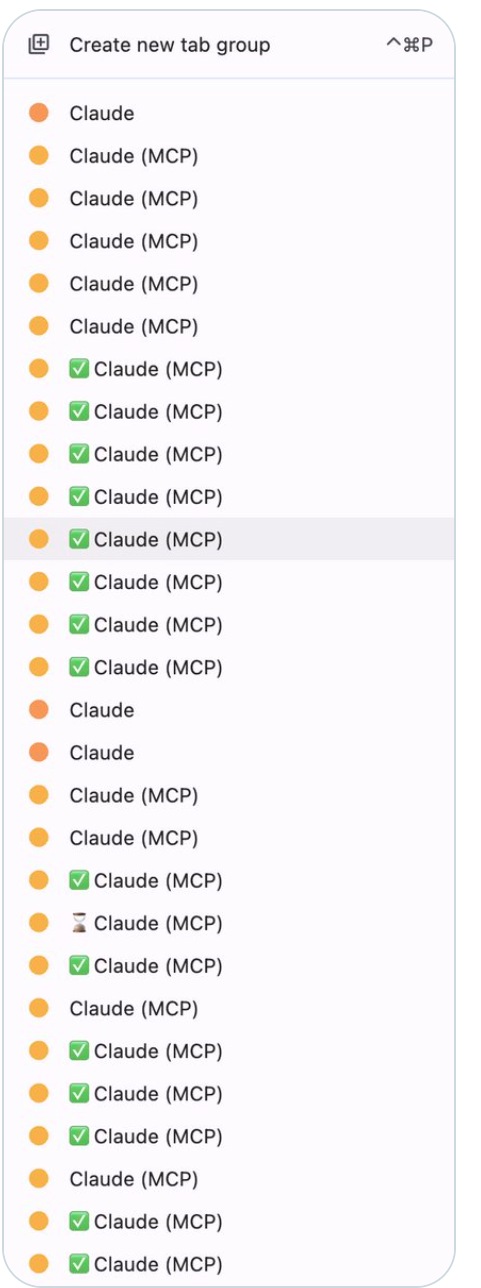
Thirty tab groups, all named Claude (MCP), left behind by the Claude Chrome extension. I asked Twitter how to clean it up. The real answer: my agents needed a browser of their own.
I got this wrong nine ways in a year. A fleet of browser servers, an official plugin, a script that copied my Chrome profile, the extension, and more. I even considered the hosted agent browsers. They work, but your credentials live in someone else's cloud.
Here's the list I should have written on day one.
1. It can't need you to click Allow
My first note on the subject, sent one morning with a screenshot of the dialog:
why it keeps asking me this permission, I want to allow it permanently
Attach automation to your already-running Chrome and newer versions ask a human to click Allow. The grant dies when Chrome restarts. One morning Chrome restarted at 08:46. The next run had nobody to click, so it timed out and logged a failure.
A browser you launch yourself, with its own profile and its own debug port, never shows this dialog. That detail is the whole fix.
2. It has to behave the same headless
Claude's Chrome extension pairs with an interactive session. Run headless (cron, dispatchers, anything unattended) and its tools are simply not there. Sixteen of my scheduled runs logged the same line: claude-in-chrome MCP absent.
My nightly Vercel job lost its browser and complained for eleven runs. On day ten it wrote three options into a log, and one of them was the exact fix. I silenced the alert instead. Ten days later I asked:
why it was failing in daily job, but worked here without issues
The answer had been sitting in a log file for thirteen days.
3. Logins have to survive
My first setup died here. Its final commit flipped every browser to "isolated": true. I fixed instability by throwing away the logins, which were the whole point.
This failure is easy to miss. A tool starts a fresh temp profile, hits a login wall, and still reports success. From my own logs: agent-browser IS installed and works but runs a fresh temp profile → vercel.com/login wall, no session.
4. Accounts must not mix
Two weeks before I built anything, I offered my agent my own Chrome, and caught myself mid-sentence:
I am logged into prod on chrome, use that, but I have already 3 orgs, will it work ?
An identity is one set of logins. Give each its own profile folder and its own fixed port:
chrome-wrapper new ecomitram --label "EcoMitram"
agent-browser --cdp $(chrome-wrapper-ecomitram --port) eval "document.title"
Choosing a port is choosing whose account you act as. A wrong port hits a login page instead of acting as the wrong person.
One rule keeps this honest: an account lives in exactly one identity. Signed into two, a wrong pick still works and you never find out.
5. You have to tell them apart
I wanted to see the CHROME PROFILE in title
Three identical "Google Chrome" windows in Cmd+Tab, two of them agents on different accounts. That's the mistake you make at 11pm.
So each identity becomes its own Mac app, with its own name, icon and colour. I look at my screen and know who's about to act as whom.
6. A human has to be able to drive it
If you can't drive the agent's browser yourself, you'll stop trusting it.
Each identity is also a command: chrome-wrapper-ecomitram launches or focuses that window. Sign in once by hand, and every agent inherits the session. Creating or deleting an identity needs a human at the terminal, on purpose.
There were also two jobs all along. Testing your own builds wants a clean, logged-out browser. The real internet wants a logged-in one. Every tool I tried was straining to be both, which is why my "which browser?" rule needed five rewrites in four months.
7. The sites have to let you in
will it be detectable that agent is driving the chrome?
Automation flags stopped being the main signal years ago. Detection now weighs your GPU, your network, your behaviour. Bad news for headless stealth setups. Good news here, because a real Chrome with a real profile and a session you signed into yourself isn't imitating a person's browser.
basically you are saying we are running chrome with stealth power ?
No stealth, nothing is pretending. At my volume, a few dashboard reads and one scheduled job, it just works. At scraping volume you'll get blocked like everyone else, and a hosted service is the right tool instead.
8. You have to own the path
Every previous answer belonged to somebody else: Anthropic's extension, someone's harness, a plugin, a hosted cloud. Chrome v136 killed one approach when it blocked debugging on default profiles. A later version's Allow gate killed another. None of that was mine to fix.
Your daily browser keeps moving underneath you, and an agent can't build on that. Owning the path means Chrome moves and I move with it, on my own schedule.
The list is the point
Nine answers in a year, each solving a slice. I kept fixing whichever symptom was loudest that week, instead of writing down what an agent's browser has to be.
If you run agents against real accounts, walk your setup down the eight. Mine failed 1, 2 and 4.
What I ended up with is one bash script, macOS only: github.com/ssv445/claude-skills, under bin/. Paste this to your agent:
Install chrome-wrapper by following
https://raw.githubusercontent.com/ssv445/claude-skills/main/bin/install-chrome-wrapper.md
The agent does everything except one step: signing in. That step is yours, at your terminal, on purpose.
I spent a year making my agents and my browser share everything, and called it collaboration. Nobody in that arrangement had a choice. Friendship is simpler: each side understands the other, and each knows how to interact.
Happy Friendship Day. Introduce your agents and your browser properly.

Shyam Verma
Full Stack Developer & Founder
Shyam Verma is a seasoned full stack developer and the founder of Ready Bytes Software Labs. With over 13 years of experience in software development, he specializes in building scalable web applications using modern technologies like React, Next.js, Node.js, and cloud platforms. His passion for technology extends beyond coding—he's committed to sharing knowledge through blog posts, mentoring junior developers, and contributing to open-source projects.